
jarle/Bun Watch Mode
skills/bun-runtime-watch-mode/SKILL.md
Automatic reloading in Bun with --watch and --hot modes
$ install --global
skillsauthnpx skillsauth add jarle/bun-skills Bun Watch ModeInstall this skill globally with one command. Works with Claude Code, Cursor, and Windsurf.
Security Scan Results
3 of 9 scanners reported clean
Some scanners were skipped, did not run, or reported a non-clean status. Review each row below.
3
Scanners Passed
9
Scanners in report
Clean
TrivyContainer and dependency vulnerability scanner
95%
Clean
SemgrepStatic code analysis for vulnerabilities
95%
Clean
mcp-scan (Snyk)Model Context Protocol security validation
95%
Skipped
Snyk (dep)Open source security scanning
50%
Skipped
Socket.devSupply chain security analysis
50%
Skipped
VirusTotalMulti-engine malware detection
50%
Skipped
CrowdStrikeAdvanced threat intelligence
50%
Skipped
OSV-ScannerOpen Source Vulnerability database check
50%
Skipped
OWASP Dep-Check
50%
Last scanned: Apr 6, 2026, 2:55 AM6.1s1 file scanned
SKILL.md
- name:
- Bun Watch Mode
- description:
- Automatic reloading in Bun with --watch and --hot modes
Watch Mode
Automatic reloading in Bun with --watch and --hot modes
Bun supports two kinds of automatic reloading via CLI flags:
--watchmode, which hard restarts Bun's process when imported files change.--hotmode, which soft reloads the code (without restarting the process) when imported files change.
--watch mode
Watch mode can be used with bun test or when running TypeScript, JSX, and JavaScript files.
To run a file in --watch mode:
bun --watch index.tsx
To run your tests in --watch mode:
bun --watch test
In --watch mode, Bun keeps track of all imported files and watches them for changes. When a change is detected, Bun restarts the process, preserving the same set of CLI arguments and environment variables used in the initial run. If Bun crashes, --watch will attempt to automatically restart the process.
Instead, Bun uses operating system native filesystem watcher APIs like kqueue or inotify to detect changes to files. Bun also does a number of optimizations to enable it scale to larger projects (such as setting a high rlimit for file descriptors, statically allocated file path buffers, reuse file descriptors when possible, etc). </Note>
The following examples show Bun live-reloading a file as it is edited, with VSCode configured to save the file on each keystroke.
bun run --watch watchy.tsx
import { serve } from "bun";

console.log("I restarted at:", Date.now());

serve({
  port: 4003,
  fetch(request) {
    return new Response("Sup");
  },
});
In this example, Bun is
<Frame> 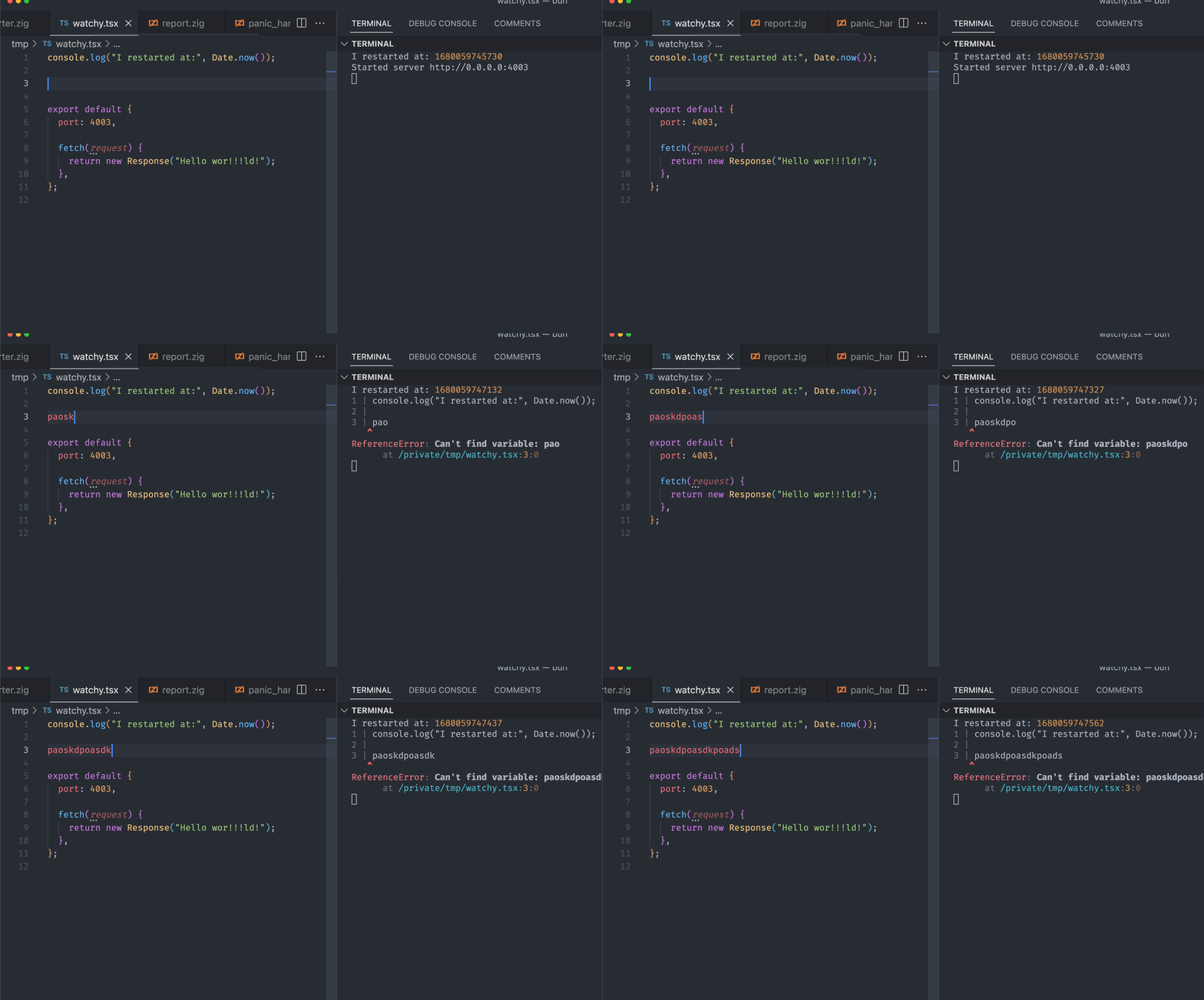 </Frame>Running bun test in watch mode and save-on-keypress enabled:
bun --watch test
--hot mode
Use bun --hot to enable hot reloading when executing code with Bun. This is distinct from --watch mode in that Bun does not hard-restart the entire process. Instead, it detects code changes and updates its internal module cache with the new code.
bun --hot server.ts
Starting from the entrypoint (server.ts in the example above), Bun builds a registry of all imported source files (excluding those in node_modules) and watches them for changes. When a change is detected, Bun performs a "soft reload". All files are re-evaluated, but all global state (notably, the globalThis object) is persisted.
// make TypeScript happy
declare global {
  var count: number;
}

globalThis.count ??= 0;
console.log(`Reloaded ${globalThis.count} times`);
globalThis.count++;

// prevent `bun run` from exiting
setInterval(function () {}, 1000000);
If you run this file with bun --hot server.ts, you'll see the reload count increment every time you save the file.
bun --hot index.ts
Reloaded 1 times
Reloaded 2 times
Reloaded 3 times
Traditional file watchers like nodemon restart the entire process, so HTTP servers and other stateful objects are lost. By contrast, bun --hot is able to reflect the updated code without restarting the process.
HTTP servers
This makes it possible, for instance, to update your HTTP request handler without shutting down the server itself. When you save the file, your HTTP server will be reloaded with the updated code without the process being restarted. This results in seriously fast refresh speeds.
globalThis.count ??= 0;
globalThis.count++;

Bun.serve({
  fetch(req: Request) {
    return new Response(`Reloaded ${globalThis.count} times`);
  },
  port: 3000,
});
- Resets the internal
requirecache and ES module registry (Loader.registry) - Runs the garbage collector synchronously (to minimize memory leaks, at the cost of runtime performance)
- Re-transpiles all of your code from scratch (including sourcemaps)
- Re-evaluates the code with JavaScriptCore
This implementation isn't particularly optimized. It re-transpiles files that haven't changed. It makes no attempt at incremental compilation. It's a starting point. </Accordion>
Related Skills
jarle/Bun TypeScript
development
VerifiedTrustedCommunity
Using TypeScript with Bun, including type definitions and compiler options
1SKILL.mdUpdated Apr 6, 2026
jarle/Bun Writing tests
development
VerifiedTrustedCommunity
Learn how to write tests using Bun's Jest-compatible API with support for async tests, timeouts, and various test modifiers
1SKILL.mdUpdated Apr 6, 2026
jarle/Bun Snapshots
testing
VerifiedTrustedCommunity
Learn how to use snapshot testing in Bun to save and compare output between test runs
1SKILL.mdUpdated Apr 6, 2026
jarle/Bun Runtime behavior
testing
VerifiedTrustedCommunity
Learn about Bun test's runtime integration, environment variables, timeouts, and error handling
1SKILL.mdUpdated Apr 6, 2026