
jarle/Bun JSX
skills/bun-runtime-jsx/SKILL.md
Built-in JSX and TSX support in Bun with configurable transpilation options
$ install --global
skillsauthnpx skillsauth add jarle/bun-skills Bun JSXInstall this skill globally with one command. Works with Claude Code, Cursor, and Windsurf.
Security Scan Results
3 of 9 scanners reported clean
Some scanners were skipped, did not run, or reported a non-clean status. Review each row below.
3
Scanners Passed
9
Scanners in report
Clean
TrivyContainer and dependency vulnerability scanner
95%
Clean
SemgrepStatic code analysis for vulnerabilities
95%
Clean
mcp-scan (Snyk)Model Context Protocol security validation
95%
Skipped
Snyk (dep)Open source security scanning
50%
Skipped
Socket.devSupply chain security analysis
50%
Skipped
VirusTotalMulti-engine malware detection
50%
Skipped
CrowdStrikeAdvanced threat intelligence
50%
Skipped
OSV-ScannerOpen Source Vulnerability database check
50%
Skipped
OWASP Dep-Check
50%
Last scanned: Apr 6, 2026, 2:55 AM5.9s1 file scanned
SKILL.md
- name:
- Bun JSX
- description:
- Built-in JSX and TSX support in Bun with configurable transpilation options
JSX
Built-in JSX and TSX support in Bun with configurable transpilation options
Bun supports .jsx and .tsx files out of the box. Bun's internal transpiler converts JSX syntax into vanilla JavaScript before execution.
function Component(props: {message: string}) {
  return (
    <body>
      <h1 style={{color: 'red'}}>{props.message}</h1>
    </body>
  );
}

console.log(<Component message="Hello world!" />);
Configuration
Bun reads your tsconfig.json or jsconfig.json configuration files to determines how to perform the JSX transform internally. To avoid using either of these, the following options can also be defined in bunfig.toml.
The following compiler options are respected.
jsx
How JSX constructs are transformed into vanilla JavaScript internally. The table below lists the possible values of jsx, along with their transpilation of the following simple JSX component:
<Box width={5}>Hello</Box>
| Compiler options | Transpiled output |
| --------------------------------------------------- | --------------------------------------------------------------------------------------------------------------------------------------------------------------------------------------------------------------------------------------------------------------------------------------------------------------------------------------------------------------------------------------------------------------------------------------------------------------------------- |
| json<br/>{<br/> "jsx": "react"<br/>}<br/> | tsx<br/>import { createElement } from "react";<br/>createElement("Box", { width: 5 }, "Hello");<br/> |
| json<br/>{<br/> "jsx": "react-jsx"<br/>}<br/> | tsx<br/>import { jsx } from "react/jsx-runtime";<br/>jsx("Box", { width: 5 }, "Hello");<br/> |
| json<br/>{<br/> "jsx": "react-jsxdev"<br/>}<br/> | tsx<br/>import { jsxDEV } from "react/jsx-dev-runtime";<br/>jsxDEV(<br/> "Box",<br/> { width: 5, children: "Hello" },<br/> undefined,<br/> false,<br/> undefined,<br/> this,<br/>);<br/><br /><br />The jsxDEV variable name is a convention used by React. The DEV suffix is a visible way to indicate that the code is intended for use in development. The development version of React is slower and includes additional validity checks & debugging tools. |
| json<br/>{<br/> "jsx": "preserve"<br/>}<br/> | tsx<br/>// JSX is not transpiled<br/>// "preserve" is not supported by Bun currently<br/><Box width={5}>Hello</Box><br/> |
jsxFactory
<Note>Note — Only applicable when jsx is react.</Note>
The function name used to represent JSX constructs. Default value is "createElement". This is useful for libraries like Preact that use a different function name ("h").
| Compiler options | Transpiled output |
| --------------------------------------------------------------------- | ------------------------------------------------------------------------------ |
| json<br/>{<br/> "jsx": "react",<br/> "jsxFactory": "h"<br/>}<br/> | tsx<br/>import { h } from "react";<br/>h("Box", { width: 5 }, "Hello");<br/> |
jsxFragmentFactory
<Note>Note — Only applicable when jsx is react.</Note>
The function name used to represent JSX fragments such as <>Hello</>; only applicable when jsx is react. Default value is "Fragment".
| Compiler options | Transpiled output |
| ------------------------------------------------------------------------------------------------------------------- | ----------------------------------------------------------------------------------------------------------------------------------------------- |
| json<br/>{<br/> "jsx": "react",<br/> "jsxFactory": "myjsx",<br/> "jsxFragmentFactory": "MyFragment"<br/>}<br/> | tsx<br/>// input<br/><>Hello</>;<br/><br/>// output<br/>import { myjsx, MyFragment } from "react";<br/>myjsx(MyFragment, null, "Hello");<br/> |
jsxImportSource
<Note>Note — Only applicable when jsx is react-jsx or react-jsxdev.</Note>
The module from which the component factory function (createElement, jsx, jsxDEV, etc) will be imported. Default value is "react". This will typically be necessary when using a component library like Preact.
| Compiler options | Transpiled output |
| ------------------------------------------------------------------------------------------------------------------ | ----------------------------------------------------------------------------------------------------------------------------------------------------------------------------------------------------------------------------------------------- |
| jsonc<br/>{<br/> "jsx": "react",<br/> // jsxImportSource is not defined<br/> // default to "react"<br/>}<br/> | tsx<br/>import { jsx } from "react/jsx-runtime";<br/>jsx("Box", { width: 5, children: "Hello" });<br/> |
| jsonc<br/>{<br/> "jsx": "react-jsx",<br/> "jsxImportSource": "preact",<br/>}<br/> | tsx<br/>import { jsx } from "preact/jsx-runtime";<br/>jsx("Box", { width: 5, children: "Hello" });<br/> |
| jsonc<br/>{<br/> "jsx": "react-jsxdev",<br/> "jsxImportSource": "preact",<br/>}<br/> | tsx<br/>// /jsx-runtime is automatically appended<br/>import { jsxDEV } from "preact/jsx-dev-runtime";<br/>jsxDEV(<br/> "Box",<br/> { width: 5, children: "Hello" },<br/> undefined,<br/> false,<br/> undefined,<br/> this,<br/>);<br/> |
JSX pragma
All of these values can be set on a per-file basis using pragmas. A pragma is a special comment that sets a compiler option in a particular file.
| Pragma | Equivalent config |
| ---------------------------------------- | ------------------------------------------------------------------ |
| ts<br/>// @jsx h<br/> | jsonc<br/>{<br/> "jsxFactory": "h",<br/>}<br/> |
| ts<br/>// @jsxFrag MyFragment<br/> | jsonc<br/>{<br/> "jsxFragmentFactory": "MyFragment",<br/>}<br/> |
| ts<br/>// @jsxImportSource preact<br/> | jsonc<br/>{<br/> "jsxImportSource": "preact",<br/>}<br/> |
Logging
Bun implements special logging for JSX to make debugging easier. Given the following file:
import { Stack, UserCard } from "./components";

console.log(
  <Stack>
    <UserCard name="Dom" bio="Street racer and Corona lover" />
    <UserCard name="Jakob" bio="Super spy and Dom's secret brother" />
  </Stack>,
);
Bun will pretty-print the component tree when logged:
<Frame>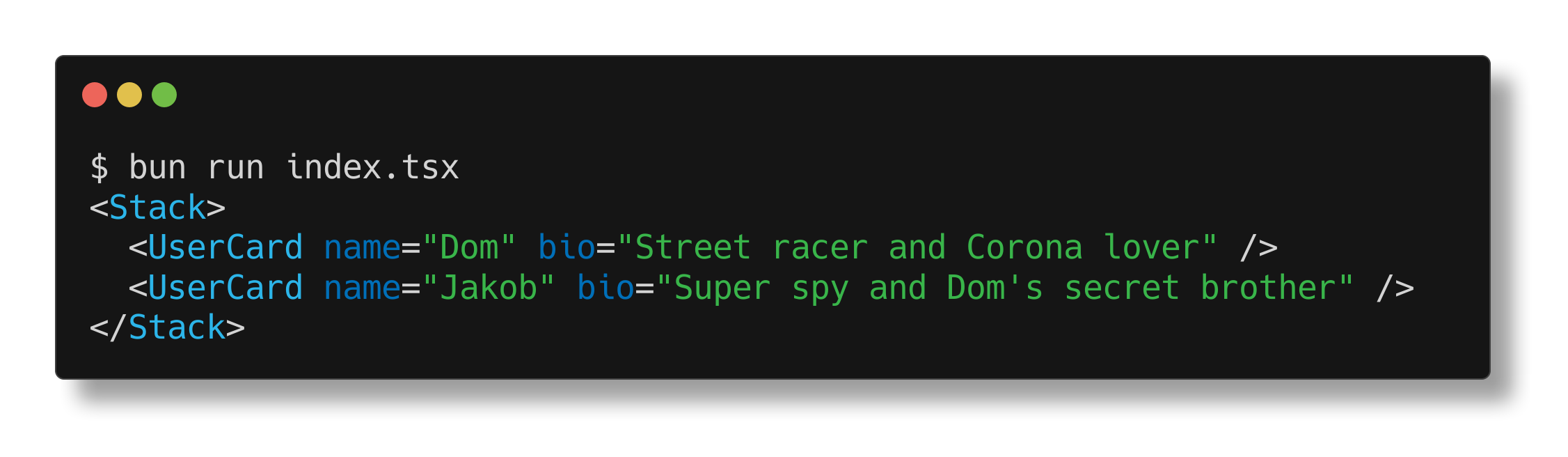</Frame>Prop punning
The Bun runtime also supports "prop punning" for JSX. This is a shorthand syntax useful for assigning a variable to a prop with the same name.
function Div(props: {className: string;}) {
  const {className} = props;

  // without punning
  return <div className={className} />;
  // with punning
  return <div {className} />;
}
Related Skills
jarle/Bun TypeScript
development
VerifiedTrustedCommunity
Using TypeScript with Bun, including type definitions and compiler options
1SKILL.mdUpdated Apr 6, 2026
jarle/Bun Writing tests
development
VerifiedTrustedCommunity
Learn how to write tests using Bun's Jest-compatible API with support for async tests, timeouts, and various test modifiers
1SKILL.mdUpdated Apr 6, 2026
jarle/Bun Snapshots
testing
VerifiedTrustedCommunity
Learn how to use snapshot testing in Bun to save and compare output between test runs
1SKILL.mdUpdated Apr 6, 2026
jarle/Bun Runtime behavior
testing
VerifiedTrustedCommunity
Learn about Bun test's runtime integration, environment variables, timeouts, and error handling
1SKILL.mdUpdated Apr 6, 2026