
jarle/Bun Server
skills/bun-runtime-http-server/SKILL.md
Use `Bun.serve` to start a high-performance HTTP server in Bun
$ install --global
skillsauthnpx skillsauth add jarle/bun-skills Bun ServerInstall this skill globally with one command. Works with Claude Code, Cursor, and Windsurf.
Security Scan Results
3 of 9 scanners reported clean
Some scanners were skipped, did not run, or reported a non-clean status. Review each row below.
3
Scanners Passed
9
Scanners in report
Clean
TrivyContainer and dependency vulnerability scanner
95%
Clean
SemgrepStatic code analysis for vulnerabilities
95%
Clean
mcp-scan (Snyk)Model Context Protocol security validation
95%
Skipped
Snyk (dep)Open source security scanning
50%
Skipped
Socket.devSupply chain security analysis
50%
Skipped
VirusTotalMulti-engine malware detection
50%
Skipped
CrowdStrikeAdvanced threat intelligence
50%
Skipped
OSV-ScannerOpen Source Vulnerability database check
50%
Skipped
OWASP Dep-Check
50%
Last scanned: Apr 6, 2026, 2:55 AM7.0s1 file scanned
SKILL.md
- name:
- Bun Server
- description:
- Use `Bun.serve` to start a high-performance HTTP server in Bun
Server
Use
Bun.serveto start a high-performance HTTP server in Bun
Basic Setup
const server = Bun.serve({
  // `routes` requires Bun v1.2.3+
  routes: {
    // Static routes
    "/api/status": new Response("OK"),

    // Dynamic routes
    "/users/:id": req => {
      return new Response(`Hello User ${req.params.id}!`);
    },

    // Per-HTTP method handlers
    "/api/posts": {
      GET: () => new Response("List posts"),
      POST: async req => {
        const body = await req.json();
        return Response.json({ created: true, ...body });
      },
    },

    // Wildcard route for all routes that start with "/api/" and aren't otherwise matched
    "/api/*": Response.json({ message: "Not found" }, { status: 404 }),

    // Redirect from /blog/hello to /blog/hello/world
    "/blog/hello": Response.redirect("/blog/hello/world"),

    // Serve a file by lazily loading it into memory
    "/favicon.ico": Bun.file("./favicon.ico"),
  },

  // (optional) fallback for unmatched routes:
  // Required if Bun's version < 1.2.3
  fetch(req) {
    return new Response("Not Found", { status: 404 });
  },
});

console.log(`Server running at ${server.url}`);
HTML imports
Bun supports importing HTML files directly into your server code, enabling full-stack applications with both server-side and client-side code. HTML imports work in two modes:
Development (bun --hot): Assets are bundled on-demand at runtime, enabling hot module replacement (HMR) for a fast, iterative development experience. When you change your frontend code, the browser automatically updates without a full page reload.
Production (bun build): When building with bun build --target=bun, the import index from "./index.html" statement resolves to a pre-built manifest object containing all bundled client assets. Bun.serve consumes this manifest to serve optimized assets with zero runtime bundling overhead. This is ideal for deploying to production.
import myReactSinglePageApp from "./index.html";

Bun.serve({
  routes: {
    "/": myReactSinglePageApp,
  },
});
HTML imports don't just serve HTML — it's a full-featured frontend bundler, transpiler, and toolkit built using Bun's bundler, JavaScript transpiler and CSS parser. You can use this to build full-featured frontends with React, TypeScript, Tailwind CSS, and more.
For a complete guide on building full-stack applications with HTML imports, including detailed examples and best practices, see /docs/bundler/fullstack.
Configuration
Changing the port and hostname
To configure which port and hostname the server will listen on, set port and hostname in the options object.
Bun.serve({
  port: 8080, // defaults to $BUN_PORT, $PORT, $NODE_PORT otherwise 3000 // [!code ++]
  hostname: "mydomain.com", // defaults to "0.0.0.0" // [!code ++]
  fetch(req) {
    return new Response("404!");
  },
});
To randomly select an available port, set port to 0.
const server = Bun.serve({
  port: 0, // random port // [!code ++]
  fetch(req) {
    return new Response("404!");
  },
});

// server.port is the randomly selected port
console.log(server.port);
You can view the chosen port by accessing the port property on the server object, or by accessing the url property.
console.log(server.port); // 3000
console.log(server.url); // http://localhost:3000
Configuring a default port
Bun supports several options and environment variables to configure the default port. The default port is used when the port option is not set.
--portCLI flag
bun --port=4002 server.ts
BUN_PORTenvironment variable
BUN_PORT=4002 bun server.ts
PORTenvironment variable
PORT=4002 bun server.ts
NODE_PORTenvironment variable
NODE_PORT=4002 bun server.ts
Unix domain sockets
To listen on a unix domain socket, pass the unix option with the path to the socket.
Bun.serve({
  unix: "/tmp/my-socket.sock", // path to socket
  fetch(req) {
    return new Response(`404!`);
  },
});
Abstract namespace sockets
Bun supports Linux abstract namespace sockets. To use an abstract namespace socket, prefix the unix path with a null byte.
Bun.serve({
  unix: "\0my-abstract-socket", // abstract namespace socket
  fetch(req) {
    return new Response(`404!`);
  },
});
Unlike unix domain sockets, abstract namespace sockets are not bound to the filesystem and are automatically removed when the last reference to the socket is closed.
idleTimeout
To configure the idle timeout, set the idleTimeout field in Bun.serve.
Bun.serve({
  // 10 seconds:
  idleTimeout: 10,

  fetch(req) {
    return new Response("Bun!");
  },
});
This is the maximum amount of time a connection is allowed to be idle before the server closes it. A connection is idling if there is no data sent or received.
export default syntax
Thus far, the examples on this page have used the explicit Bun.serve API. Bun also supports an alternate syntax.
import type { Serve } from "bun";

export default {
  fetch(req) {
    return new Response("Bun!");
  },
} satisfies Serve.Options<undefined>;
The type parameter <undefined> represents WebSocket data — if you add a websocket handler with custom data attached via server.upgrade(req, { data: ... }), replace undefined with your data type.
Instead of passing the server options into Bun.serve, export default it. This file can be executed as-is; when Bun sees a file with a default export containing a fetch handler, it passes it into Bun.serve under the hood.
Hot Route Reloading
Update routes without server restarts using server.reload():
const server = Bun.serve({
  routes: {
    "/api/version": () => Response.json({ version: "1.0.0" }),
  },
});

// Deploy new routes without downtime
server.reload({
  routes: {
    "/api/version": () => Response.json({ version: "2.0.0" }),
  },
});
Server Lifecycle Methods
server.stop()
To stop the server from accepting new connections:
const server = Bun.serve({
  fetch(req) {
    return new Response("Hello!");
  },
});

// Gracefully stop the server (waits for in-flight requests)
await server.stop();

// Force stop and close all active connections
await server.stop(true);
By default, stop() allows in-flight requests and WebSocket connections to complete. Pass true to immediately terminate all connections.
server.ref() and server.unref()
Control whether the server keeps the Bun process alive:
// Don't keep process alive if server is the only thing running
server.unref();

// Restore default behavior - keep process alive
server.ref();
server.reload()
Update the server's handlers without restarting:
const server = Bun.serve({
  routes: {
    "/api/version": Response.json({ version: "v1" }),
  },
  fetch(req) {
    return new Response("v1");
  },
});

// Update to new handler
server.reload({
  routes: {
    "/api/version": Response.json({ version: "v2" }),
  },
  fetch(req) {
    return new Response("v2");
  },
});
This is useful for development and hot reloading. Only fetch, error, and routes can be updated.
Per-Request Controls
server.timeout(Request, seconds)
Set a custom idle timeout for individual requests:
const server = Bun.serve({
  async fetch(req, server) {
    // Set 60 second timeout for this request
    server.timeout(req, 60);

    // If they take longer than 60 seconds to send the body, the request will be aborted
    await req.text();

    return new Response("Done!");
  },
});
Pass 0 to disable the timeout for a request.
server.requestIP(Request)
Get client IP and port information:
const server = Bun.serve({
  fetch(req, server) {
    const address = server.requestIP(req);
    if (address) {
      return new Response(`Client IP: ${address.address}, Port: ${address.port}`);
    }
    return new Response("Unknown client");
  },
});
Returns null for closed requests or Unix domain sockets.
Server Metrics
server.pendingRequests and server.pendingWebSockets
Monitor server activity with built-in counters:
const server = Bun.serve({
  fetch(req, server) {
    return new Response(
      `Active requests: ${server.pendingRequests}\n` + `Active WebSockets: ${server.pendingWebSockets}`,
    );
  },
});
server.subscriberCount(topic)
Get count of subscribers for a WebSocket topic:
const server = Bun.serve({
  fetch(req, server) {
    const chatUsers = server.subscriberCount("chat");
    return new Response(`${chatUsers} users in chat`);
  },
  websocket: {
    message(ws) {
      ws.subscribe("chat");
    },
  },
});
Benchmarks
Below are Bun and Node.js implementations of a simple HTTP server that responds Bun! to each incoming Request.
Bun.serve({
  fetch(req: Request) {
    return new Response("Bun!");
  },
  port: 3000,
});
require("http")
  .createServer((req, res) => res.end("Bun!"))
  .listen(8080);
The Bun.serve server can handle roughly 2.5x more requests per second than Node.js on Linux.
| Runtime | Requests per second | | ------- | ------------------- | | Node 16 | ~64,000 | | Bun | ~160,000 |
<Frame> 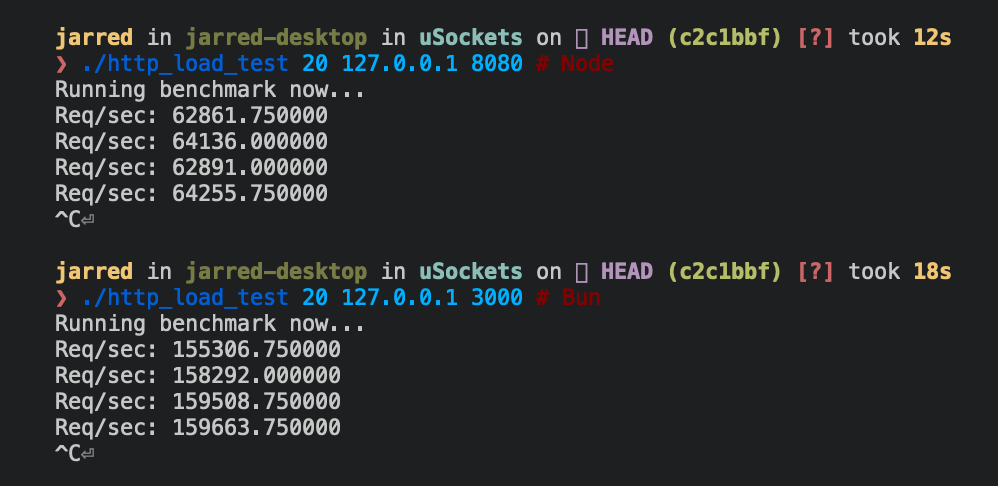 </Frame>Practical example: REST API
Here's a basic database-backed REST API using Bun's router with zero dependencies:
<CodeGroup> ```ts server.ts expandable icon="file-code" theme={"theme":{"light":"github-light","dark":"dracula"}} import type { Post } from "./types.ts"; import { Database } from "bun:sqlite";const db = new Database("posts.db");
db.exec( CREATE TABLE IF NOT EXISTS posts ( id TEXT PRIMARY KEY, title TEXT NOT NULL, content TEXT NOT NULL, created_at TEXT NOT NULL ) );
Bun.serve({ routes: { // List posts "/api/posts": { GET: () => { const posts = db.query("SELECT * FROM posts").all(); return Response.json(posts); },
    // Create post
    POST: async req => {
      const post: Omit<Post, "id" | "created_at"> = await req.json();
      const id = crypto.randomUUID();

      db.query(
        `INSERT INTO posts (id, title, content, created_at)
         VALUES (?, ?, ?, ?)`,
      ).run(id, post.title, post.content, new Date().toISOString());

      return Response.json({ id, ...post }, { status: 201 });
    },
  },

  // Get post by ID
  "/api/posts/:id": req => {
    const post = db.query("SELECT * FROM posts WHERE id = ?").get(req.params.id);

    if (!post) {
      return new Response("Not Found", { status: 404 });
    }

    return Response.json(post);
  },
},

error(error) {
  console.error(error);
  return new Response("Internal Server Error", { status: 500 });
},
});
```ts types.ts icon="https://mintcdn.com/bun-1dd33a4e/nIz6GtMH5K-dfXeV/icons/typescript.svg?fit=max&auto=format&n=nIz6GtMH5K-dfXeV&q=85&s=5d73d76daf7eb7b158469d8c30d349b0" theme={"theme":{"light":"github-light","dark":"dracula"}}
export interface Post {
  id: string;
  title: string;
  content: string;
  created_at: string;
}
Reference
interface Server extends Disposable {
  /**
   * Stop the server from accepting new connections.
   * @param closeActiveConnections If true, immediately terminates all connections
   * @returns Promise that resolves when the server has stopped
   */
  stop(closeActiveConnections?: boolean): Promise<void>;

  /**
   * Update handlers without restarting the server.
   * Only fetch and error handlers can be updated.
   */
  reload(options: Serve): void;

  /**
   * Make a request to the running server.
   * Useful for testing or internal routing.
   */
  fetch(request: Request | string): Response | Promise<Response>;

  /**
   * Upgrade an HTTP request to a WebSocket connection.
   * @returns true if upgrade successful, false if failed
   */
  upgrade<T = undefined>(
    request: Request,
    options?: {
      headers?: Bun.HeadersInit;
      data?: T;
    },
  ): boolean;

  /**
   * Publish a message to all WebSocket clients subscribed to a topic.
   * @returns Bytes sent, 0 if dropped, -1 if backpressure applied
   */
  publish(
    topic: string,
    data: string | ArrayBufferView | ArrayBuffer | SharedArrayBuffer,
    compress?: boolean,
  ): ServerWebSocketSendStatus;

  /**
   * Get count of WebSocket clients subscribed to a topic.
   */
  subscriberCount(topic: string): number;

  /**
   * Get client IP address and port.
   * @returns null for closed requests or Unix sockets
   */
  requestIP(request: Request): SocketAddress | null;

  /**
   * Set custom idle timeout for a request.
   * @param seconds Timeout in seconds, 0 to disable
   */
  timeout(request: Request, seconds: number): void;

  /**
   * Keep process alive while server is running.
   */
  ref(): void;

  /**
   * Allow process to exit if server is only thing running.
   */
  unref(): void;

  /** Number of in-flight HTTP requests */
  readonly pendingRequests: number;

  /** Number of active WebSocket connections */
  readonly pendingWebSockets: number;

  /** Server URL including protocol, hostname and port */
  readonly url: URL;

  /** Port server is listening on */
  readonly port: number;

  /** Hostname server is bound to */
  readonly hostname: string;

  /** Whether server is in development mode */
  readonly development: boolean;

  /** Server instance identifier */
  readonly id: string;
}

interface WebSocketHandler<T = undefined> {
  /** Maximum WebSocket message size in bytes */
  maxPayloadLength?: number;

  /** Bytes of queued messages before applying backpressure */
  backpressureLimit?: number;

  /** Whether to close connection when backpressure limit hit */
  closeOnBackpressureLimit?: boolean;

  /** Called when backpressure is relieved */
  drain?(ws: ServerWebSocket<T>): void | Promise<void>;

  /** Seconds before idle timeout */
  idleTimeout?: number;

  /** Enable per-message deflate compression */
  perMessageDeflate?:
    | boolean
    | {
        compress?: WebSocketCompressor | boolean;
        decompress?: WebSocketCompressor | boolean;
      };

  /** Send ping frames to keep connection alive */
  sendPings?: boolean;

  /** Whether server receives its own published messages */
  publishToSelf?: boolean;

  /** Called when connection opened */
  open?(ws: ServerWebSocket<T>): void | Promise<void>;

  /** Called when message received */
  message(ws: ServerWebSocket<T>, message: string | Buffer): void | Promise<void>;

  /** Called when connection closed */
  close?(ws: ServerWebSocket<T>, code: number, reason: string): void | Promise<void>;

  /** Called when ping frame received */
  ping?(ws: ServerWebSocket<T>, data: Buffer): void | Promise<void>;

  /** Called when pong frame received */
  pong?(ws: ServerWebSocket<T>, data: Buffer): void | Promise<void>;
}

interface TLSOptions {
  /** Certificate authority chain */
  ca?: string | Buffer | BunFile | Array<string | Buffer | BunFile>;

  /** Server certificate */
  cert?: string | Buffer | BunFile | Array<string | Buffer | BunFile>;

  /** Path to DH parameters file */
  dhParamsFile?: string;

  /** Private key */
  key?: string | Buffer | BunFile | Array<string | Buffer | BunFile>;

  /** Reduce TLS memory usage */
  lowMemoryMode?: boolean;

  /** Private key passphrase */
  passphrase?: string;

  /** OpenSSL options flags */
  secureOptions?: number;

  /** Server name for SNI */
  serverName?: string;
}
Related Skills
jarle/Bun TypeScript
development
VerifiedTrustedCommunity
Using TypeScript with Bun, including type definitions and compiler options
1SKILL.mdUpdated Apr 6, 2026
jarle/Bun Writing tests
development
VerifiedTrustedCommunity
Learn how to write tests using Bun's Jest-compatible API with support for async tests, timeouts, and various test modifiers
1SKILL.mdUpdated Apr 6, 2026
jarle/Bun Snapshots
testing
VerifiedTrustedCommunity
Learn how to use snapshot testing in Bun to save and compare output between test runs
1SKILL.mdUpdated Apr 6, 2026
jarle/Bun Runtime behavior
testing
VerifiedTrustedCommunity
Learn about Bun test's runtime integration, environment variables, timeouts, and error handling
1SKILL.mdUpdated Apr 6, 2026