
jarle/Bun bun --filter
skills/bun-pm-filter/SKILL.md
Select packages by pattern in a monorepo using the --filter flag
$ install --global
skillsauthnpx skillsauth add jarle/bun-skills Bun bun --filterInstall this skill globally with one command. Works with Claude Code, Cursor, and Windsurf.
Security Scan Results
3 of 9 scanners reported clean
Some scanners were skipped, did not run, or reported a non-clean status. Review each row below.
3
Scanners Passed
9
Scanners in report
Clean
TrivyContainer and dependency vulnerability scanner
95%
Clean
SemgrepStatic code analysis for vulnerabilities
95%
Clean
mcp-scan (Snyk)Model Context Protocol security validation
95%
Skipped
Snyk (dep)Open source security scanning
50%
Skipped
Socket.devSupply chain security analysis
50%
Skipped
VirusTotalMulti-engine malware detection
50%
Skipped
CrowdStrikeAdvanced threat intelligence
50%
Skipped
OSV-ScannerOpen Source Vulnerability database check
50%
Skipped
OWASP Dep-Check
50%
Last scanned: Apr 6, 2026, 2:52 AM23.7s1 file scanned
SKILL.md
- name:
- Bun bun --filter
- description:
- Select packages by pattern in a monorepo using the --filter flag
bun --filter
Select packages by pattern in a monorepo using the --filter flag
The --filter (or -F) flag is used for selecting packages by pattern in a monorepo. Patterns can be used to match package names or package paths, with full glob syntax support.
Currently --filter is supported by bun install and bun outdated, and can also be used to run scripts for multiple packages at once.
Matching
Package Name --filter <pattern>
Name patterns select packages based on the package name, as specified in package.json. For example, if you have packages pkg-a, pkg-b and other, you can match all packages with *, only pkg-a and pkg-b with pkg*, and a specific package by providing the full name of the package.
Package Path --filter ./<glob>
Path patterns are specified by starting the pattern with ./, and will select all packages in directories that match the pattern. For example, to match all packages in subdirectories of packages, you can use --filter './packages/**'. To match a package located in packages/foo, use --filter ./packages/foo.
bun install and bun outdated
Both bun install and bun outdated support the --filter flag.
bun install by default will install dependencies for all packages in the monorepo. To install dependencies for specific packages, use --filter.
Given a monorepo with workspaces pkg-a, pkg-b, and pkg-c under ./packages:
# Install dependencies for all workspaces except `pkg-c`
bun install --filter '!pkg-c'

# Install dependencies for packages in `./packages` (`pkg-a`, `pkg-b`, `pkg-c`)
bun install --filter './packages/*'

# Save as above, but exclude the root package.json
bun install --filter '!./' --filter './packages/*'
Similarly, bun outdated will display outdated dependencies for all packages in the monorepo, and --filter can be used to restrict the command to a subset of the packages:
# Display outdated dependencies for workspaces starting with `pkg-`
bun outdated --filter 'pkg-*'

# Display outdated dependencies for only the root package.json
bun outdated --filter './'
For more information on both these commands, see bun install and bun outdated.
Running scripts with --filter
Use the --filter flag to execute scripts in multiple packages at once:
bun --filter <pattern> <script>
Say you have a monorepo with two packages: packages/api and packages/frontend, both with a dev script that will start a local development server. Normally, you would have to open two separate terminal tabs, cd into each package directory, and run bun dev:
cd packages/api
bun dev

# in another terminal
cd packages/frontend
bun dev
Using --filter, you can run the dev script in both packages at once:
bun --filter '*' dev
Both commands will be run in parallel, and you will see a nice terminal UI showing their respective outputs:
<Frame>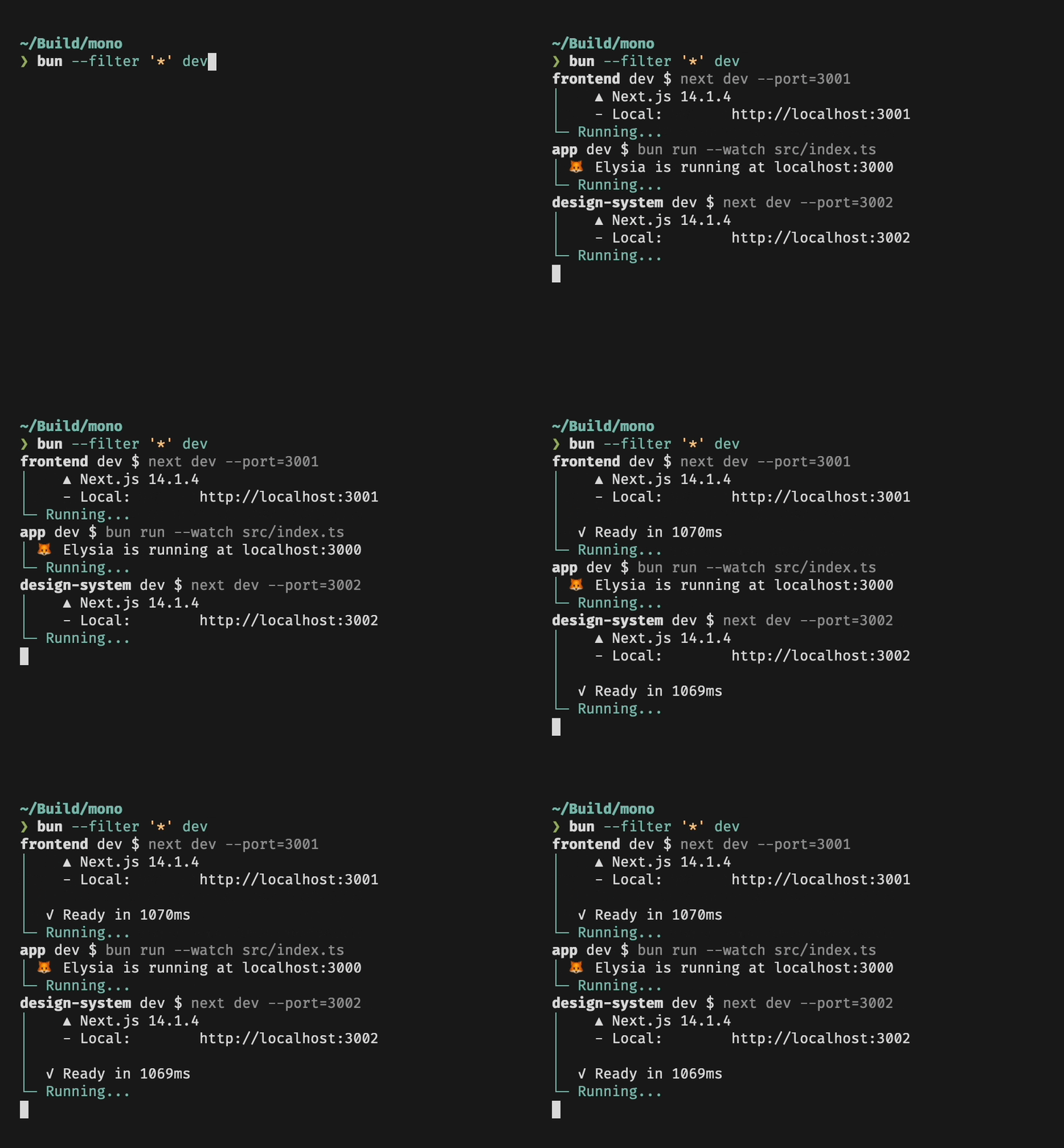</Frame>Running scripts in workspaces
Filters respect your workspace configuration: If you have a package.json file that specifies which packages are part of the workspace,
--filter will be restricted to only these packages. Also, in a workspace you can use --filter to run scripts in packages that are located anywhere in the workspace:
# Packages
# src/foo
# src/bar

# in src/bar: runs myscript in src/foo, no need to cd!
bun run --filter foo myscript
Parallel and sequential mode
Combine --filter or --workspaces with --parallel or --sequential to run scripts across workspace packages with Foreman-style prefixed output:
# Run "build" in all matching packages concurrently
bun run --parallel --filter '*' build

# Run "build" in all workspace packages sequentially
bun run --sequential --workspaces build

# Run glob-matched scripts across all packages
bun run --parallel --filter '*' "build:*"

# Continue running even if one package's script fails
bun run --parallel --no-exit-on-error --filter '*' test

# Run multiple scripts across all packages
bun run --parallel --filter '*' build lint
Each line of output is prefixed with the package and script name (e.g. pkg-a:build | ...). Without --filter/--workspaces, the prefix is just the script name (e.g. build | ...). When a package's package.json has no name field, the relative path from the workspace root is used instead.
Use --if-present with --workspaces to skip packages that don't have the requested script instead of erroring.
Dependency Order
Bun will respect package dependency order when running scripts. Say you have a package foo that depends on another package bar in your workspace, and both packages have a build script. When you run bun --filter '*' build, you will notice that foo will only start running once bar is done.
Related Skills
jarle/Bun TypeScript
development
VerifiedTrustedCommunity
Using TypeScript with Bun, including type definitions and compiler options
1SKILL.mdUpdated Apr 6, 2026
jarle/Bun Writing tests
development
VerifiedTrustedCommunity
Learn how to write tests using Bun's Jest-compatible API with support for async tests, timeouts, and various test modifiers
1SKILL.mdUpdated Apr 6, 2026
jarle/Bun Snapshots
testing
VerifiedTrustedCommunity
Learn how to use snapshot testing in Bun to save and compare output between test runs
1SKILL.mdUpdated Apr 6, 2026
jarle/Bun Runtime behavior
testing
VerifiedTrustedCommunity
Learn about Bun test's runtime integration, environment variables, timeouts, and error handling
1SKILL.mdUpdated Apr 6, 2026