
adamshl-oss/ui-test
skills/ui-test/SKILL.md
Plain English E2E UI testing. Describe tests in natural language, agent executes via browser tool, then exports real Playwright test scripts for CI/CD. Use when asked to create UI tests, test a website, or generate Playwright scripts.
tools
Updated Mar 27, 2026
$ install --global
skillsauthnpx skillsauth add adamshl-oss/alfred ui-testInstall this skill globally with one command. Works with Claude Code, Cursor, and Windsurf.
Security Scan Results
3 of 9 scanners reported clean
Some scanners were skipped, did not run, or reported a non-clean status. Review each row below.
3
Scanners Passed
9
Scanners in report
Clean
TrivyContainer and dependency vulnerability scanner
95%
Clean
SemgrepStatic code analysis for vulnerabilities
95%
Clean
mcp-scan (Snyk)Model Context Protocol security validation
95%
Skipped
Snyk (dep)Open source security scanning
50%
Skipped
Socket.devSupply chain security analysis
50%
Skipped
VirusTotalMulti-engine malware detection
50%
Skipped
CrowdStrikeAdvanced threat intelligence
50%
Skipped
OSV-ScannerOpen Source Vulnerability database check
50%
Skipped
OWASP Dep-Check
50%
Last scanned: Mar 29, 2026, 3:41 AM36.7s3 files scanned
SKILL.md
- name:
- ui-test
- description:
- Plain English E2E UI testing. Describe tests in natural language, agent executes via browser tool, then exports real Playwright test scripts for CI/CD. Use when asked to create UI tests, test a website, or generate Playwright scripts.
- metadata:
- {"clawdbot":{"emoji":"🧪"}}
UI Test — Plain English E2E Testing (🧪)
Describe your UI tests in plain English. The agent figures out how to find buttons, navigate the app flow, and execute each step — no selectors or code needed. It screenshots every major step, stitches them into a walkthrough video, and DMs you the result with a pass/fail report.
Made in 🤠 Texas ❤️ PlebLab
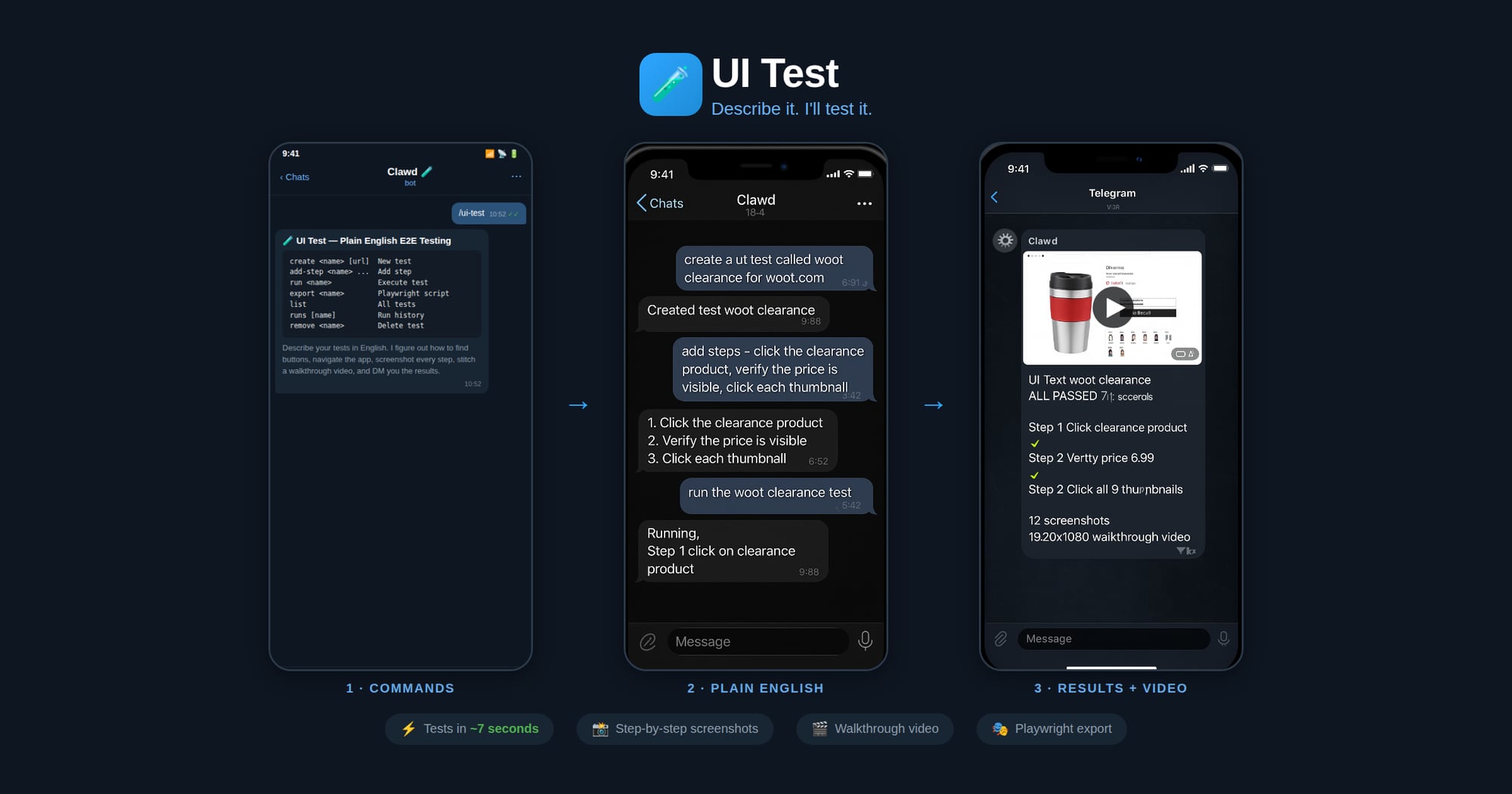
Workflow
- Create — User names a test and describes steps in plain English
- Run — Agent opens the clawd browser, executes each step, screenshots each action
- Export — Agent generates a Playwright
.spec.tsfrom the verified steps - CI/CD — User drops the script into their test suite, runs with
npx playwright test
Agent Execution Flow
When running a test:
- Load test definition:
node scripts/ui-test.js get "<name>" - Start clawd browser:
browser action=start profile=clawd - Navigate to the test URL
- For each plain English step:
a. Interpret what the user means (click, type, assert, wait, etc.)
b. Use
browser action=snapshotto see the page c. Usebrowser action=actwith the appropriate request (click/type/press/etc.) d. Take a screenshot after each step e. Record what selector/ref was used and whether it passed - Save run results:
node scripts/ui-test.js save-run "<name>" passed=true/false - Report results to user with pass/fail per step
When exporting to Playwright:
- Load the test definition and most recent successful run
- Map each plain English step to Playwright API calls based on what worked during execution
- Generate a
.spec.tsfile with proper imports, test structure, and assertions - Save to the user's project or a specified output path
Step Interpretation Guide
The agent should interpret plain English steps like:
| User says | Browser action | Playwright equivalent |
|-----------|---------------|----------------------|
| "click the Sign In button" | act: click ref="Sign In button" | page.getByRole('button', {name: 'Sign In'}).click() |
| "type [email protected] in the email field" | act: type ref="email" text="[email protected]" | page.getByLabel('Email').fill('[email protected]') |
| "verify the dashboard shows Welcome" | snapshot + check text | expect(page.getByText('Welcome')).toBeVisible() |
| "wait for the page to load" | act: wait | page.waitForLoadState('networkidle') |
| "click the hamburger menu" | act: click (find menu icon) | page.getByRole('button', {name: 'menu'}).click() |
| "scroll down" | act: evaluate fn="window.scrollBy(0,500)" | page.evaluate(() => window.scrollBy(0, 500)) |
| "check the Remember Me checkbox" | act: click ref="Remember Me" | page.getByLabel('Remember Me').check() |
| "select 'USD' from the currency dropdown" | act: select values=["USD"] | page.getByLabel('Currency').selectOption('USD') |
| "take a screenshot" | browser action=screenshot | page.screenshot({path: 'step-N.png'}) |
| "verify URL contains /dashboard" | check current URL | expect(page).toHaveURL(/dashboard/) |
Commands
Run via: node ~/workspace/skills/ui-test/scripts/ui-test.js <command>
| Command | Description |
|---------|-------------|
| create <name> [url] | Create a new test |
| add-step <name> <step> | Add a plain English step |
| set-steps <name> <json> | Replace all steps |
| set-url <name> <url> | Set the test URL |
| get <name> | Show test definition |
| list | List all tests |
| remove <name> | Delete a test |
| save-run <name> ... | Save execution results |
| runs [name] | Show run history |
| export <name> [outfile] | Export as Playwright script |
Export Format
Generated Playwright files include:
- Proper TypeScript imports
test.describeblock with test nametest.beforeEachwith navigation to base URL- Each step as a sequential action with comments showing the original English
- Assertions where the user said "verify", "check", "should", "expect"
- Screenshots on failure
Screenshots & Video
During test execution, the agent should:
- Before each step: take a screenshot → save as
step-NN-before.jpg - After each step: take a screenshot → save as
step-NN-after.jpg - On failure: take a screenshot → save as
step-NN-FAIL.jpg
Screenshots are saved to: ~/.ui-tests/runs/<slug>-<timestamp>/
After the run completes, generate a walkthrough video:
ffmpeg -framerate 1 -pattern_type glob -i '~/.ui-tests/runs/<folder>/step-*.jpg' \
  -vf "scale=1280:-2" -c:v libx264 -pix_fmt yuv420p -y output.mp4
Then send the video to the chat.
Storage
- Test definitions:
~/.ui-tests/<slug>.json - Run history:
~/.ui-tests/runs/<slug>-<timestamp>/run.json - Screenshots:
~/.ui-tests/runs/<slug>-<timestamp>/step-*.jpg - Video:
~/.ui-tests/runs/<slug>-<timestamp>/walkthrough.mp4 - Exported scripts: user-specified path or
./tests/<slug>.spec.ts
Related Skills
adamshl-oss/websocket-engineer
development
VerifiedTrustedCommunity
Use when building real-time communication systems with WebSockets or Socket.IO. Invoke for bidirectional messaging, horizontal scaling with Redis, presence tracking, room management.
SKILL.mdUpdated Mar 27, 2026
adamshl-oss/web-design-guidelines
development
VerifiedTrustedCommunity
Review UI code for Web Interface Guidelines compliance. Use when asked to "review my UI", "check accessibility", "audit design", "review UX", or "check my site against best practices".
SKILL.mdUpdated Mar 27, 2026
adamshl-oss/web-deploy-github
tools
VerifiedTrustedCommunity
Create and deploy single-page static websites to GitHub Pages with autonomous workflow. Use when building portfolio sites, CV pages, landing pages, or any static web project that needs GitHub Pages deployment. Handles complete workflow from project initialization to live deployment with GitHub Actions automation.
SKILL.mdUpdated Mar 27, 2026
adamshl-oss/todoist
tools
VerifiedTrustedCommunity
Manage Todoist tasks. Use when the user mentions "todoist", "my tasks", "task list", "add a task", "complete task", or wants to interact with their Todoist account.
SKILL.mdUpdated Mar 27, 2026